
Recruiters have discovered Claude Code. Hiring-tech vendors noticed: Truffle published a guide teaching recruiters to use it for rewriting job descriptions, summarizing interview notes, and pipeline reporting, and at least half a dozen other vendors are racing to publish against the same queries. The interest is real, and it makes sense: a terminal where you type "compare my top two candidates" beats learning another dashboard.
But almost everything published so far shares one limitation. The workflows are prompt hacks: you copy data out of your hiring tools, paste it into a chat, read the answer, and copy something back. Useful, but the ceiling is low. This post is about what changes when Claude is actually connected to your ATS.
The copy-paste ceiling
Run any generic "Claude for recruiting" workflow and you become the integration layer. You export the resume, paste it in. You paste the job description above it. You describe your pipeline state from memory. Claude does genuinely good analysis, and then that analysis lands in the one place your hiring team will never look: your chat history.
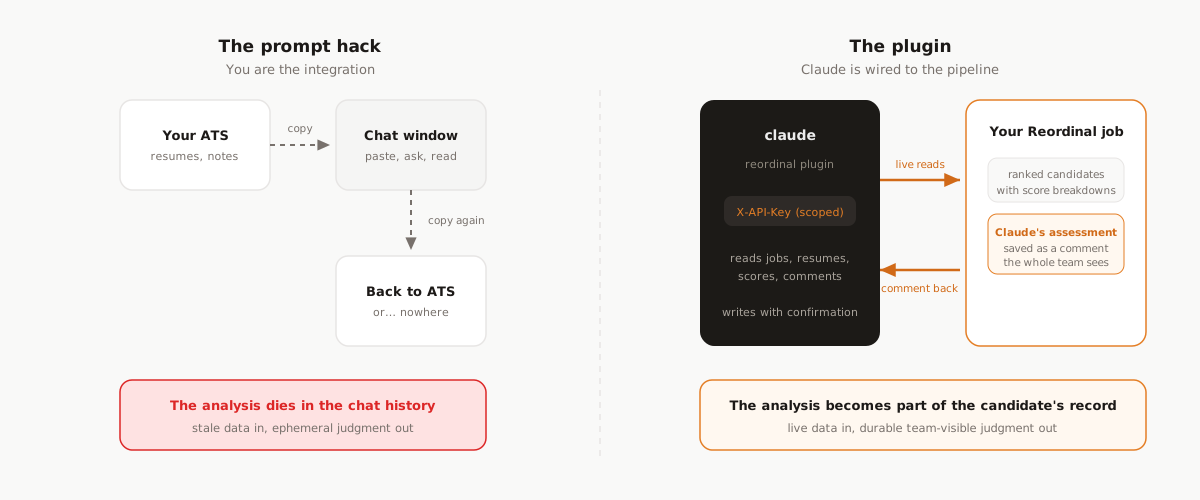
Three problems compound:
- Stale, partial input. Claude only knows what you pasted. It cannot see the ranked list, the screening answers, or what your teammate said about the same candidate yesterday.
- Ephemeral output. The assessment evaporates when the session ends. Your co-founder reviewing the same candidate tomorrow re-derives it, or worse, decides differently without it.
- Manual everything. Twelve candidates means twelve rounds of copy, paste, read, repeat. The whole point was to stop doing that.
What a real integration looks like
Reordinal ships an open-source Claude Code plugin that connects Claude to your ATS through a scoped API key. Not a wrapper around a chat window: a set of skills that let Claude read your actual pipeline and write back to it.
Claude can read your jobs with their hiring stages and scoring criteria, the ranked candidate list with filters ("screening stage, ATS above 75, best first"), each candidate's parsed resume and per-criterion score breakdown, and the team's existing comments. And it can act: move stages, manage tags, rerun scoring, and, the part that changes the workflow, save its assessment as a comment on the candidate.
The flagship flow: analysis that your team actually sees
Here is the loop in a real session:
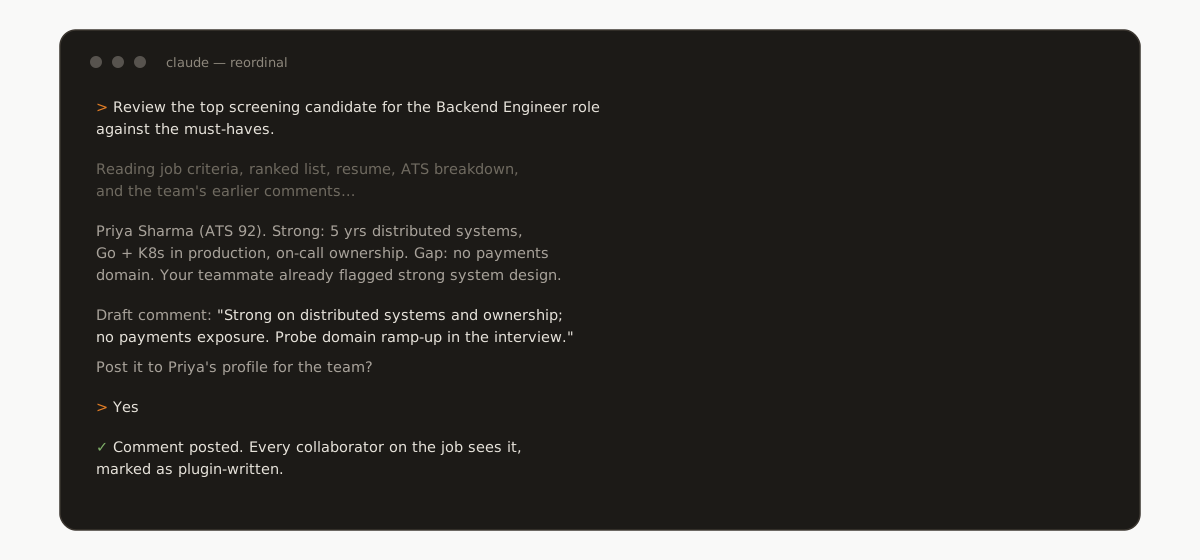
Ask Claude to review a candidate and it reads everything a diligent teammate would: the job's must-haves, the parsed resume, the ATS breakdown with matched and missing criteria, and the comments your team already left. It drafts a tight assessment, shows you the exact text, and only after you confirm does it post the comment.
That comment lands on the candidate's profile in the dashboard, in the same thread as human comments, visible to every collaborator on the job, and marked as plugin-written so nobody mistakes AI-drafted analysis for a teammate's note. Your terminal session produced a durable artifact in the system of record. That is the difference between a prompt hack and an integration.
There is also a principled reason to want this, beyond convenience. We wrote about what makes AI screening trustworthy: reasons a human can check, and human judgment that gets recorded. Comments are exactly where that judgment lives. The plugin does not decide anything; it drafts, you approve, the team sees.
Beyond comments: what else a wired-in Claude can do
The comment flow is the flagship because it changes where analysis lives, but the same plumbing supports the rest of a review session:
- Filtered shortlists. "Screening stage, ATS above 75, applied in the last two weeks, best first" is one request. The plugin passes real filters (score range, stage, date, name search) to the API instead of eyeballing a dashboard.
- Head-to-head comparisons. Ask for your top two candidates side by side and Claude reads both parsed resumes, both score breakdowns, and the team's comments on each, then argues the tradeoff instead of restating the resumes.
- Interview preparation. Every ATS analysis includes suggested interview questions grounded in the candidate's specific gaps and claims. Ask Claude to build an interview plan and it starts from those, the criteria, and whatever your teammates flagged in comments.
- Pipeline actions. Move a candidate to the next stage, tag the shortlist ("strong-backend", "future-fit"), or rerun scoring after you tighten the job description. Reads are free; only re-scoring costs a credit, and the plugin warns you before spending it.
None of this needs a new command language. The skills teach Claude the API; you talk about candidates.
The safety model
Handing an AI agent write access to your hiring pipeline should make you ask questions. The answers are structural, not promises:
- Scoped keys. The plugin authenticates with an API key you create in your workspace settings and can revoke at any time. A key can be limited to specific teams or jobs; anything outside its scope is invisible to it, not just forbidden.
- Reads are free, writes are confirmed. Browsing jobs, candidates, resumes, and scores has no side effects. The four writes (stage, tags, re-scoring, comments) are confirmed with you in the session before they happen, and re-scoring warns you it costs a credit.
- No destructive surface. The plugin's API cannot delete candidates, edit contact details, or touch billing. The worst realistic outcome of a confused session is a comment you did not want, which you can delete in the dashboard.
Setup, honestly measured in minutes
/plugin marketplace add reordinal/claude-reordinal
/plugin install reordinal@reordinal
Then create an API key in your workspace settings, export it, and launch:
export REORDINAL_API_KEY=rd_live_...
claude
From there it is plain English: "show me my open jobs", "who are the strongest candidates in screening", "summarize this one against the must-haves and save it for the team". The full reference lives at docs.reordinal.com, and the plugin itself is open source on GitHub.
Where this is going
The vendors publishing "use Claude to rewrite your job descriptions" guides are not wrong; they are early. Text generation was the first thing LLMs were good at, so it is the first thing everyone productized. But recruiting's real bottleneck is not writing; it is reading (hundreds of resumes) and remembering (what the team concluded about each one). Those are exactly the two things an agent wired to your ATS does better than an agent in a chat window.
If you already have a Reordinal workspace, the plugin is two commands away. If not, start with one job, import your applicants, and try asking a terminal who you should interview.
Frequently asked questions
Can Claude Code connect to an ATS?
Yes, through an integration built for it. Reordinal ships an open-source Claude Code plugin that connects over a scoped API key: Claude reads jobs, ranked candidates, parsed resumes, and score breakdowns, and writes stage moves, tags, and team-visible comments.
Is it safe to give an AI agent access to my hiring pipeline?
It depends on the permissions, so scope them structurally. The Reordinal plugin uses an API key you can limit to specific teams or jobs and revoke anytime, all writes are confirmed with you in the session first, and the API has no destructive surface: it cannot delete candidates, edit contact details, or touch billing.
What can the Reordinal Claude plugin read and write?
It reads jobs with stages and criteria, filtered candidate lists, parsed resumes, ATS breakdowns with suggested interview questions, and team comments. It writes four things, each confirmed before it happens: stage moves, tags, score reruns, and comments marked as plugin-written.
Do I need to know how to code to use it?
No. Setup is two plugin commands and pasting an API key, and everything after that is plain English: "show me my open jobs", "who are the strongest candidates in screening", "summarize this one against the must-haves and save it for the team".
What is the difference between using ChatGPT for recruiting and an ATS plugin?
A chat assistant only knows what you paste and its output stays in the chat. A plugin wired to your ATS reads live pipeline data, filters real candidate lists, and saves its analysis back as comments your team sees, so the work compounds instead of evaporating.