
You did the hard part. Four hundred applicants became twelve people worth an interview. Now comes the part nobody warns you about: twelve separate emails saying roughly the same thing, twelve rounds of "does Tuesday at 3 work?", and a calendar that fills up through negotiation instead of a link.
Scheduling tools solved half of this years ago. A Calendly or Cal.com link means the candidate picks a slot that is genuinely free, and the back-and-forth dies. The unsolved half is getting that link to candidates: personally, consistently, and without writing the same email twelve times. This post is about that half.
Write the interview invite once
In Reordinal, email templates live at the workspace level. You write the invite one time, in rich text or markdown, and mark it with a category (interview, assessment, rejection, offer, or general) so it shows up where it belongs.
The personalization comes from tokens. Anywhere in the subject or body you can drop a placeholder, and it resolves per candidate at send time:
{{candidate_first_name}},{{candidate_name}},{{candidate_email}}{{job_title}},{{company}},{{stage}}{{sender_name}},{{sender_title}},{{sender_signature}}{{current_date}}
So the template says:
Hi
{{candidate_first_name}}, thanks for applying for the{{job_title}}role at{{company}}. We would love to talk. Grab any slot that works for you here:{{scheduling_link}}
and every candidate gets an email that reads like you wrote it for them, because in the way that matters, you did.
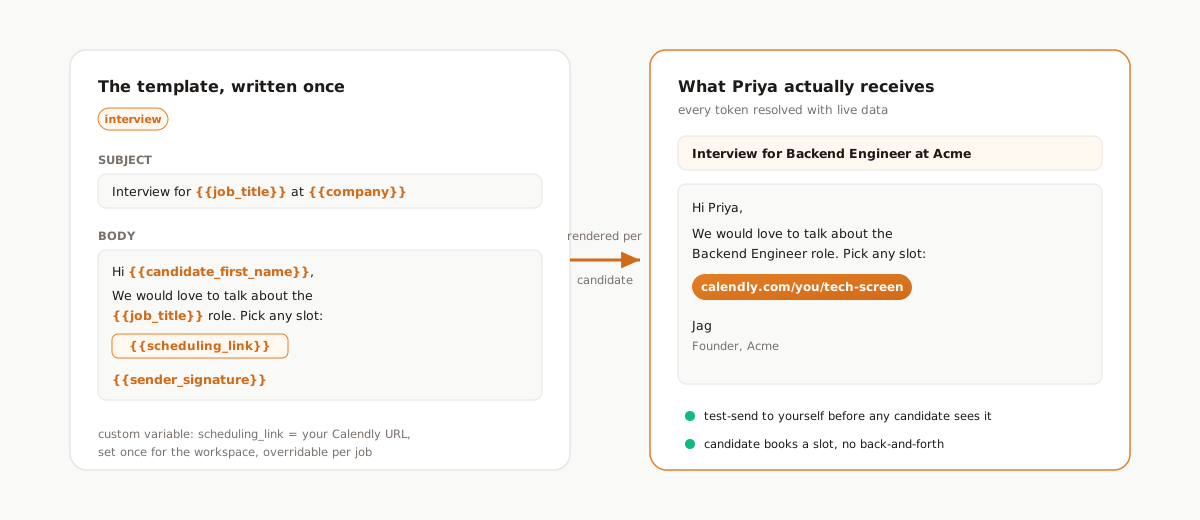
Templates have a draft state, so you can work on wording without a half-finished email showing up in your send menu, and a test-send button that delivers the rendered email to your own inbox before any candidate sees it.
Your Calendly link is a variable, not a paste
That {{scheduling_link}} token is not built in; it is yours. Reordinal
lets you declare custom variables at the workspace level: name it once, set
the value to your Calendly URL, and every template can use it.
Two details make this more useful than pasting the link into each template:
- Change it in one place. New booking page, longer interview slots, a co-founder taking over screens for a month: update the variable and every template that references it is current.
- Override it per job. Variables can be redefined at the job level, so your engineering role can point at a 45-minute technical-screen link while the sales role uses a 20-minute intro slot, with the same template text.
The same mechanism works for anything you repeat: office address, a take-home brief URL, a hiring-page link.
Invite one candidate, or a whole stage
For a single candidate, you send straight from their profile. The template picker is stage-aware: templates suggested for the candidate's current stage sort to the top, so the interview invite is one click when they are sitting in your Interview column.
When you have a dozen people to invite, you send to the stage instead:
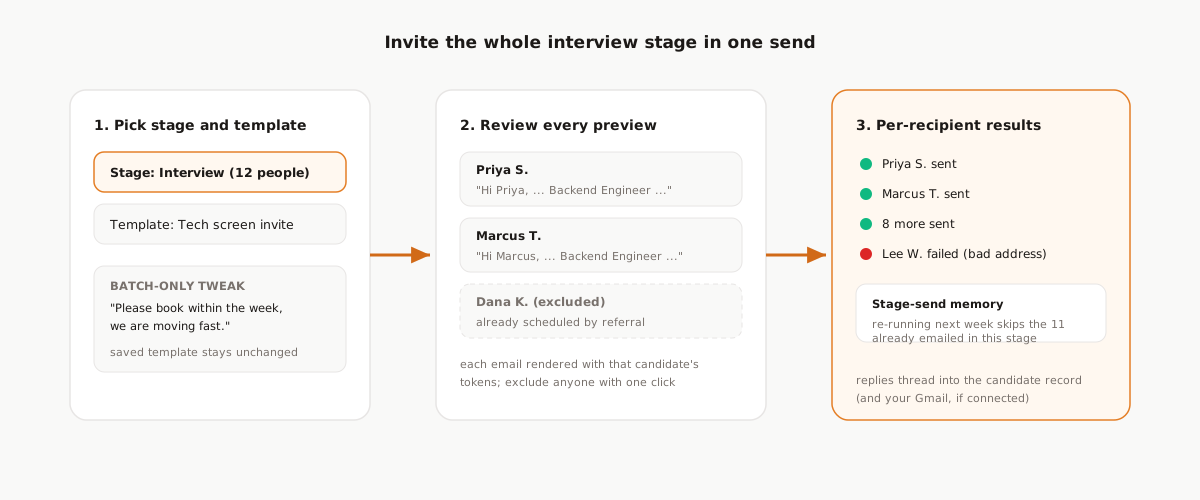
Pick the stage, pick the template, and review before anything goes out. Every candidate gets their own rendered preview, and you can exclude individuals from the batch. If this batch needs a tweak ("we are hiring fast, please book within the week"), you can edit the subject and body for this send without touching the saved template.
Then the guardrails, because bulk email to real candidates deserves them:
- Per-recipient results. Each send reports sent or failed individually, with the error when one bounces, so one bad address never hides in a batch summary.
- No accidental double-sends. Reordinal tracks which stages a candidate has already been emailed in, so re-running "email the interview stage" next week will not re-invite the people you emailed today.
Replies land in your inbox, not a void
Recruiting email fails when it comes from an address nobody answers. Reordinal handles this two ways.
Connect your Gmail account and candidate emails send through your own mailbox: they come from your address, sit in your Sent folder, and when the candidate replies, the thread shows up both in Gmail and on the candidate's record in Reordinal, next to their resume, score, and your team's comments. You can reply from either place and the thread stays intact.
Without Gmail connected, emails go out from a Reordinal sending address, with reply-to set to you, so answers still arrive in your inbox. Connecting Gmail is better; not connecting it is still safe.
The same system closes the loop
Once templates exist, the interview invite is just the happy path. The same categories, tokens, and bulk send handle the emails founders avoid: the rejection note to the sixty people you screened out (we wrote a whole playbook on rejecting without ghosting), the assessment instructions with the take-home link, the offer email that should absolutely not have a copy-pasted wrong name in it.
Triage tells you who to talk to. We covered that in the screening playbook. Templates make the talking start without a week of calendar tennis.
Frequently asked questions
How do I send my Calendly link to job candidates?
Declare a custom variable in Reordinal (for example scheduling_link) with your Calendly URL as the value, reference it in an email template, and send the template to one candidate or a whole interview stage. Each candidate books their own slot, with no back-and-forth.
What should an interview invitation email include?
The role and company, the interview format and length, who the candidate will meet, and one clear action: a scheduling link where they pick a time. Personalize the greeting with the candidate name, which template tokens handle automatically.
Can I bulk email job applicants at once?
Yes. In Reordinal you select a pipeline stage, pick a template, review a personalized preview per candidate, and send. Results are reported per recipient, and stage tracking prevents emailing the same person twice from the same stage.
Do candidate emails come from my own address?
If you connect Gmail, yes: emails send through your mailbox, appear in your Sent folder, and replies thread into both Gmail and the candidate record. Without Gmail, emails send from a Reordinal address with reply-to set to you.
What variables can I use in a recruiting email template?
Built-in tokens cover the candidate (name, first name, email), the job (title, company, stage), and the sender (name, title, signature), plus the current date. You can also declare custom workspace variables, like a scheduling link or office address, and override them per job.