
Somewhere in your LinkedIn account is a closed job with a few hundred applicants attached to it. You hired someone, closed the post, moved on. But applicant number two, the person you agonized over before picking the winner, is still in there. So is the strong candidate who withdrew for a counteroffer, and the one who was great but six months too junior.
When the next role opens, those people are the fastest interviews you will ever schedule. They already know your company, they already showed intent, and you already know they are good. Recruiters call them silver medalists, and the entire discipline of candidate rediscovery exists because most teams lose track of them the day a job closes.
What LinkedIn keeps, and what it locks
The good news: closing a job does not delete anything. LinkedIn keeps closed job posts accessible under the Closed tab, applicant list included, as long as you collected applications on LinkedIn. Jobs also close on their own: a posting auto-closes after six months even if you never touch it, so "I never closed it" still means closed eventually.
The bad news is that the closed-job view is the same one-applicant-at-a-time panel you escaped when the job was live. No bulk resume download, no export, no way to see the pool as a pool. The data survives; the access does not scale.
Pull them out while you still can
The Reordinal Chrome extension works on closed LinkedIn jobs exactly as it does on live ones: open the closed job's applicant view, select candidates, and export them with resume PDFs and screening answers into a Reordinal job. There is no date cutoff; applicants from a role you filled last year come across the same way as yesterday's.
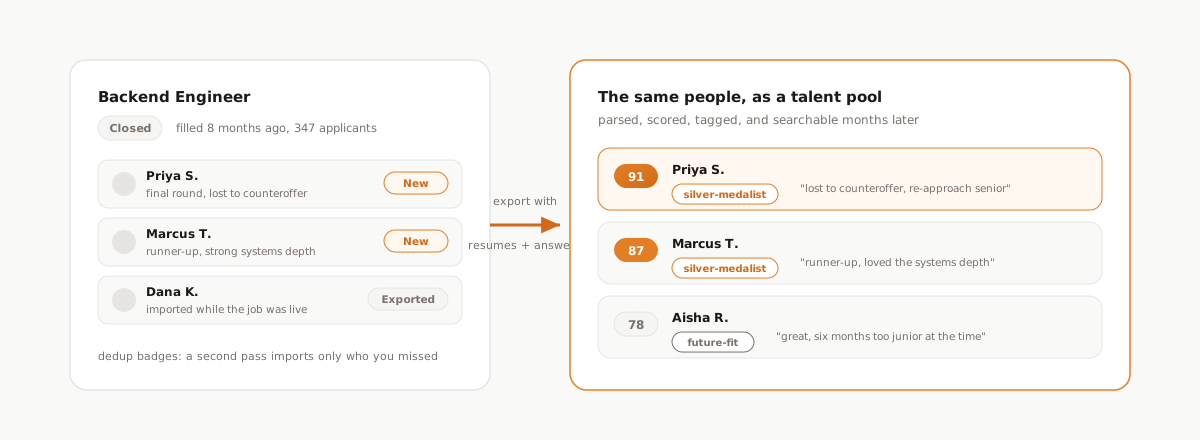
If you already exported some of these people while the job was live, the extension's dedup check has you covered: every candidate shows a New or Exported badge, so a second pass over an old job imports only the people you missed, never duplicates.
Once they are in, three habits turn an old applicant list into an actual talent pool:
- Tag the tier. "silver-medalist" for final-rounders, "future-fit" for the too-junior-today people. Tags are custom, colored, and filterable, so the pool stays queryable months later.
- Write down the why. A one-line comment ("lost to counteroffer, loved the systems depth, re-approach for senior roles") is what makes the pool useful to whoever opens it next quarter, including future you.
- Keep the scores. Imported candidates get parsed and scored like any other, so when a new role opens you can re-run scoring against the new description and see who from the old pool ranks for the new job.
Re-engage without being weird about it
The re-engagement email is where most talent-pool plans die, because writing forty personal notes is exactly the kind of work that never happens. This is what email templates are for: a re-engagement template with candidate tokens and your scheduling link as a variable, sent to the tagged slice of the pool.
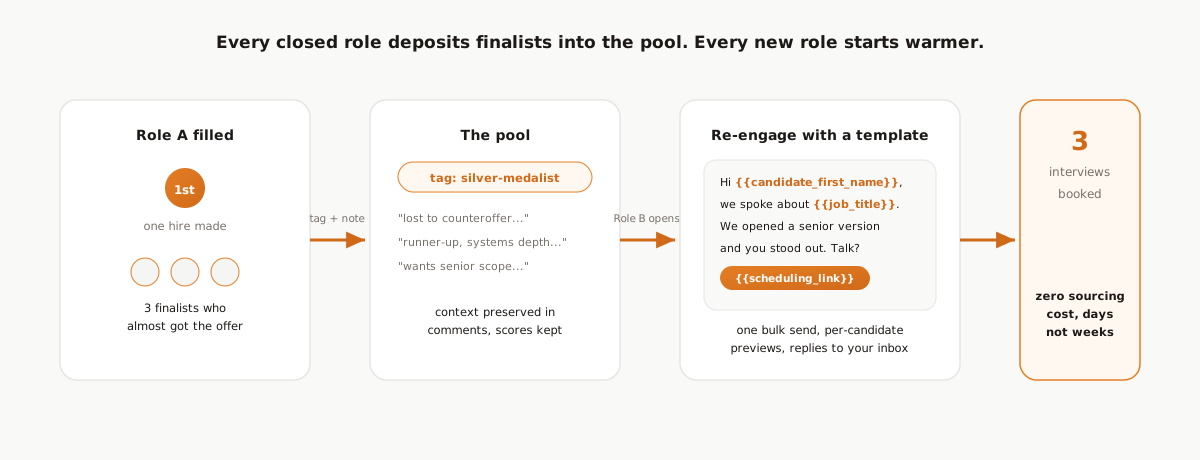
The note itself should be honest and short. You are not blasting a job ad at strangers; you are following up with someone you nearly hired:
Hi
{{candidate_first_name}}, we spoke last year about the{{job_title}}role. We just opened a senior version of it and you were one of the strongest people in that process. If you are open to a conversation, grab a slot:{{scheduling_link}}
Sent to fifteen tagged silver medalists, that is one template, one bulk send with per-candidate previews, and usually a handful of interviews on the calendar within days, from people you already vetted, at exactly zero sourcing cost.
The compounding part
Do this once and it is a nice trick. Do it for every role and each search starts warmer than the last: every closed job deposits its finalists into the pool, comments preserve the context, and consistent screening questions keep the pool filterable across roles. The 400-applicant pile you triaged stops being a one-time cost and starts being an asset that pays out on the next opening.
Frequently asked questions
Can I see applicants after my LinkedIn job closes?
Yes. LinkedIn keeps closed job posts and their applicant lists accessible under the Closed tab of your job posts, as long as you collected applications on LinkedIn. You can view applicants one at a time, but LinkedIn offers no bulk export from that view.
How do I export applicants from a closed LinkedIn job?
The Reordinal Chrome extension works on closed jobs the same as live ones: open the closed job's applicant view, select candidates, and export them with resume PDFs and screening answers into a Reordinal job. There is no date cutoff on how old the applicants can be.
What is a silver medalist candidate?
A candidate who reached the final stages of a past hiring process but was not the person hired. They are pre-vetted, already interested, and typically the fastest and cheapest strong candidates to re-engage when a similar role opens.
How long does a LinkedIn job post stay active?
Until you close it manually, or six months after posting, at which point LinkedIn closes it automatically. The applicant list remains viewable after closing either way.
How do I re-engage past applicants for a new role?
Tag your finalists when a role closes, keep a short comment on why each was passed over, and when the next role opens send a personal-feeling template email that references the earlier process and includes a scheduling link. Small tagged batches with per-candidate previews work better than a broadcast.