
Every LinkedIn job post lets you attach screening questions, and Easy Apply makes candidates answer them before submitting. Which means that for every applicant in your pile, you already have structured answers to the exact questions you care about: work authorization, years of experience, notice period, salary expectation.
Then almost nobody uses them. Not because the answers are worthless, but because LinkedIn shows them one applicant at a time, inside each profile card. There is no view where you can ask "show me everyone who answered yes to work authorization and under 30 days of notice." So the one piece of structured data candidates hand you gets skimmed once and forgotten.
This playbook has two halves: writing questions that are worth filtering on, and getting the answers into a place where filtering is possible.
Half one: write questions that separate candidates
LinkedIn will auto-suggest screening questions from your job description, and the defaults are fine but generic. A few rules make them earn their place:
Ask what the resume cannot tell you. Years of experience is on the resume; the parser will find it. Notice period, salary expectation, willingness to work your time zone, and work authorization are not on the resume, and they disqualify more candidates than any skill gap. Those are screening-question material.
Prefer numbers and yes/no over prose. "Describe your experience with Postgres" produces essays you will not read at volume. "How many years have you run Postgres in production?" produces a number you can sort by.
Only mark must-haves you mean. LinkedIn lets you flag a question as a must-have qualification and auto-archive everyone who fails it, optionally with an automatic rejection email. Understand what that is: a hard rule that rejects people before any human or model looks at them. It is the crudest form of automated rejection, cruder than anything the AI-screening debate worries about, so reserve it for genuinely binary facts like work authorization, and let everything else stay a signal instead of a guillotine.
Three to five questions, not ten. Every added question costs applicant completion, and past five you are writing an application form, not a screen.
Half two: get the answers somewhere you can filter
Here is what changes when the answers leave LinkedIn. When you export applicants with the Reordinal Chrome extension, each candidate comes across with their resume PDF and their complete screening Q&A: the question, the candidate's answer, and whether it matched the ideal answer you set on LinkedIn.
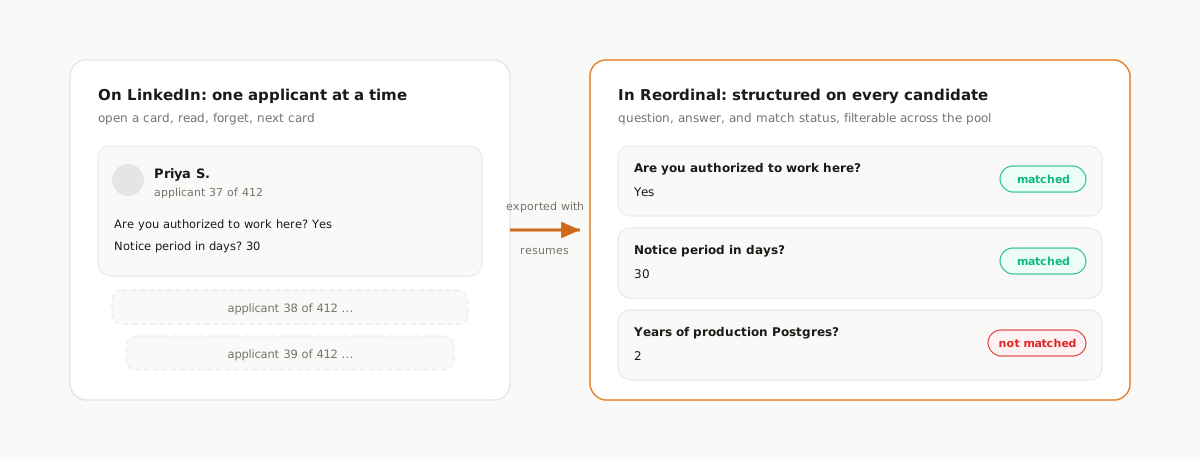
Every candidate in Reordinal has a Screening tab showing that full Q&A with match status. But the point is not reading them one by one; that is the LinkedIn experience you just escaped. The point is the list view:
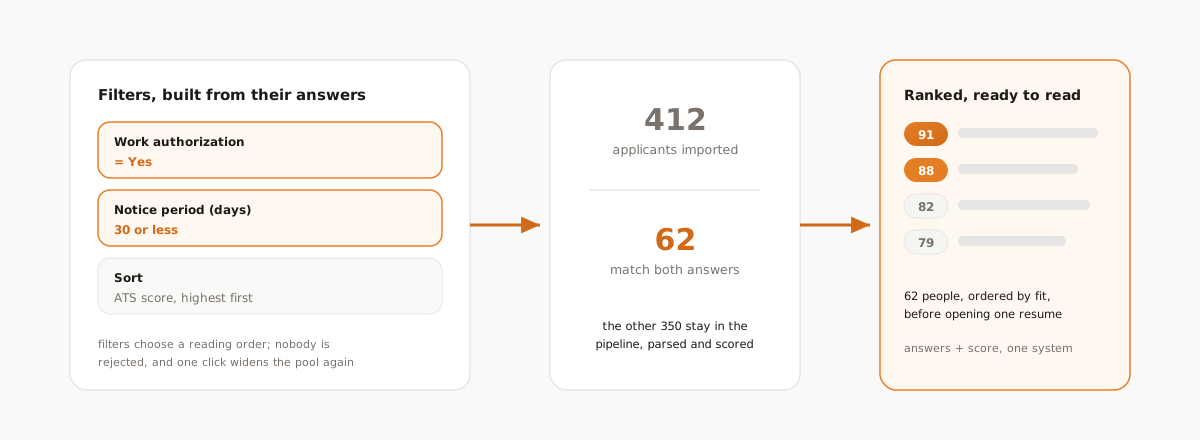
Screening answers are filters. Text questions filter by answer, number questions filter by range, and filters stack with everything else: stage, tags, and the ATS score. So the first pass on a 400-applicant role can be: work authorization yes, notice period 30 days or less, sorted by score descending. That is a 62-person list, ordered by fit, before you have opened a single resume, built entirely from data candidates gave you voluntarily.
Two things make this trustworthy rather than just fast:
- Filtering is not rejecting. The 338 people outside the filter are still in the pipeline, parsed and scored. You are choosing a reading order, and you can loosen the filter in one click when the shortlist runs thin.
- The match flags carry over but do not decide. LinkedIn's matched/not-matched markers come across with the export, and they stay what they should have been all along: a signal a human looks at, next to the resume and the score breakdown. They also export to a spreadsheet with the answers, which is how you audit whether your questions filter anyone at all.
The compounding trick: ask what you will filter by
Once you know the answers become filterable, question design gets a feedback loop. Before posting the role, ask: what would I want to filter this pile by? If the honest answer is "notice period, comp expectation, and time-zone overlap," those are your three questions. The screening questions and the triage workflow become one system, designed together.
That is also the argument for keeping questions consistent across similar roles. Ask notice period the same way every time and your re-engagement pool from closed jobs stays filterable months later, when the next role opens and you want "everyone from the last three backend roles who can start within a month."
Frequently asked questions
How do I see applicant answers to LinkedIn screening questions?
On LinkedIn, open each applicant profile card individually to see their answers. To see answers across all applicants at once, export them into an ATS: the Reordinal Chrome extension captures each candidate's full screening Q&A with match status, and makes the answers filterable in the candidate list.
What are good screening questions for LinkedIn Easy Apply?
Ask what the resume cannot tell you: work authorization, notice period, salary expectation, time-zone availability. Prefer yes/no and numeric formats over open text, and keep it to three to five questions so completion rates stay high.
Does LinkedIn automatically reject candidates who fail screening questions?
Only if you enable it. Marking a question as a must-have qualification lets LinkedIn auto-archive candidates who do not meet it and optionally send a rejection email. Use that only for binary facts like work authorization, since it rejects people before anyone reviews them.
Can I filter job applicants by their screening answers?
Not on LinkedIn. In Reordinal, screening answers become list filters: text answers filter by value, numeric answers filter by range, and they combine with ATS score, stage, and tag filters to cut a large applicant pool to a reviewable shortlist.
Do screening question answers export with the applicants?
Yes. The Reordinal Chrome extension exports each Easy Apply applicant with their resume PDF and their complete screening Q&A, including the question, the answer, and LinkedIn's matched or not-matched status.