
Post a free job on LinkedIn and it feels open-ended: the listing sits in your dashboard, marked open, until you decide otherwise. LinkedIn's documentation on free and promoted jobs describes something much shorter. As of mid-2026, a free post is paused after it has been active for 14 days. Before that, it disappears from search results once it reaches the free applicant limit, which typically ranges from 10 to 30 applicants depending on the role. Even before either line is crossed, free posts become less visible in search results over time. And you get one free job post at a time over 30 days, so a wasted post is a wasted month.
Whichever limit arrives first, that is the post's real lifespan: 14 days at the absolute most, often much less. Once you internalize that, the way you run a free post changes completely. The first few days are not a warm-up while you get organized. They are the whole show.
This post walks through each limit, what it means when a lean team is hiring on a founder's schedule, and how to plan a hire that fits inside the window LinkedIn actually gives you.
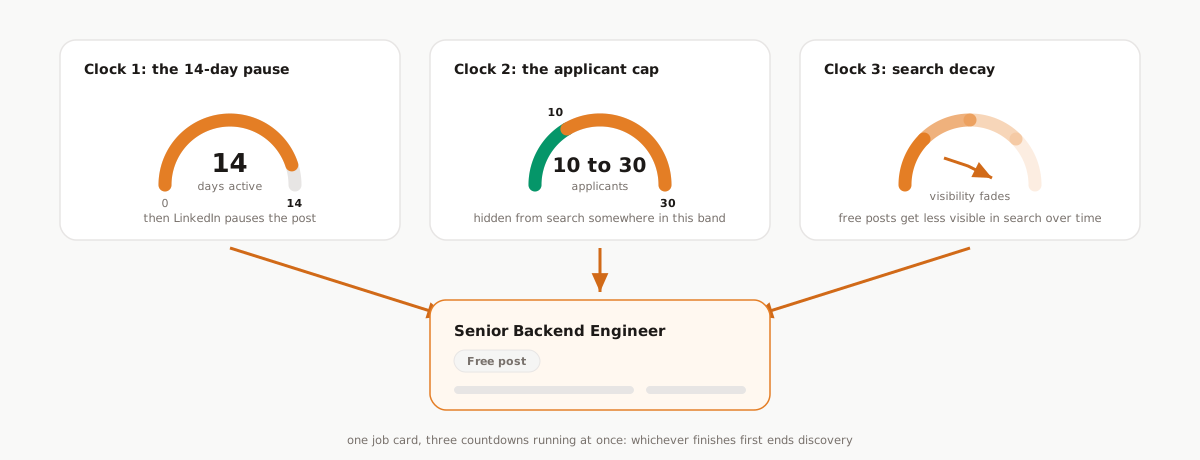
Clock one: the 14-day pause
The hardest limit is time. LinkedIn pauses a free job post after it has been active for 14 days. Not closes, pauses: the post stops running, and if you still need applicants you either promote it or wait out the rest of your 30-day window for the next free slot.
Fourteen days sounds workable until you map a normal founder hiring process onto it. If you spend the first week "letting applications come in" before looking at anyone, half the post's life is gone. If your plan is to review candidates once the post winds down, the post will wind itself down before your calendar thinks the process has started. The pause is not a deadline for finishing the hire, but it is a hard deadline for collecting the people you will hire from.
Clock two: the applicant cap you cannot see
The second limit usually strikes first for any role with real demand. Free posts remain active but are hidden from search results after reaching the free applicant limit, and LinkedIn says that limit typically ranges from 10 to 30 applicants depending on the role.
Read that range again: 10 to 30. Not hundreds. Application volume has surged across the market. Appcast's 2026 benchmark report, built on roughly 1,200 employers and 27 million applications, found apply rates surging through 2025 even as recruitment costs rose in a softer labor market. A visible post for a popular role can plausibly collect its thirtieth applicant within the first couple of days. When it does, discovery ends.
Two details make the cap sneaky:
LinkedIn gives you a range, not a number. The limit is typically 10 to 30 "depending on the role," and you will not know in advance where your post's line sits. The only safe assumption is the low end.
A capped post still looks alive. It remains active. The job shows as open, and candidates who already have the link can still reach it. What disappears is discovery: new candidates searching for a role like yours stop seeing the post.
A capped post is easy to misread as a weak market. Applications taper instead of stopping, the post still shows as active, and the natural conclusion, "nobody good is looking right now," is exactly backwards. The candidates are out there; the post has simply stopped being shown to them.
Clock three: quiet decay
Even a post that has not hit its cap and has not reached day 14 is fading. LinkedIn's documentation says free posts become less visible in search results over time, while promoted posts are shown at the top of search results and can carry a Promoted tag. And per LinkedIn's job post visibility documentation, promoted visibility and traffic scale with budget on a cost-per-click model. Decay is not a malfunction; it is the free tier working as designed, with sustained visibility reserved for posts that pay.
The practical consequence: day one is the best visibility your free post will ever have. Every plan that assumes "it will pick up next week" has the curve exactly backwards.
The fourth limit: one free slot per 30 days
The three clocks govern one post. The fourth limit governs your month: LinkedIn allows one free job at a time over 30 days.
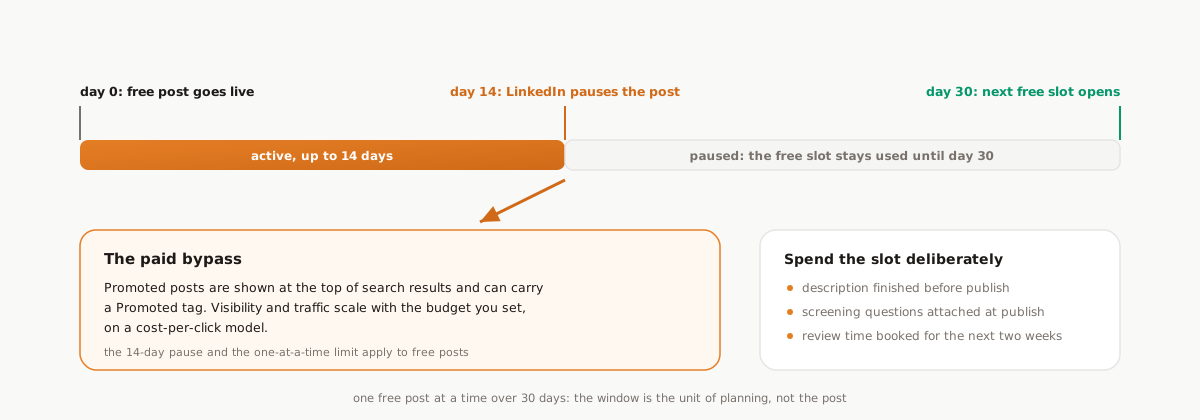
That makes the free slot a scarce resource, and most teams spend it badly. Publishing a half-written description on a Thursday afternoon "to see what happens" costs the same slot as a fully prepared launch. And if the post flops, you cannot simply delete it and try again tomorrow: quick reposts have their own rulebook, which we cover in LinkedIn's 7-day repost rule, and the 30-day window does not reset early either way.
So before the slot is spent, ask three questions: is the description finished, are the screening questions attached, and do the next two weeks of your calendar have room to review applicants? If any answer is no, the cheapest move is to wait a few days. Burning the slot early costs the month.
Check where your post is on any given day
Drag the day slider and pick an applicant pace to see which state your free post is likely in at each point of the 30-day window.
Free post lifespan timeline
Pick a day and an applicant pace to see which state a free LinkedIn job post is in.
- Visible in search
- Cap band: may be hidden (10 to 30 applicants)
- Paused until the window resets
Day 7: Inside the cap band
The free applicant limit typically falls between 10 and 30 depending on the role. At this pace the post may already be hidden from search results.
Roughly 15 applicants so far at this pace.
Based on LinkedIn Help documentation, mid-2026: free posts pause after 14 active days, are hidden from search after 10 to 30 applicants depending on the role, and one free post is allowed at a time over 30 days.
The applicant pace is an assumption you choose above, not a prediction. States shown are estimates, not guarantees.
The window is worth more than it looks
The compressed lifespan would be a disaster if applications arrived evenly over a month. They do not. Appcast's analysis of job ad performance finds that more than half of all applications arrive within the first ten days of a posting going live, and that nearly 20 percent of applications land on a Monday, tapering through the week. Appcast's network skews toward high-volume and hourly hiring, so treat those as cross-platform patterns rather than LinkedIn-specific numbers, but the shape is consistent: application flow is front-loaded, hard.
That shape is the good news. LinkedIn's limits and the arrival curve roughly agree: most of the applicants you were ever going to get show up in the days the post is most alive. A 14-day post is not half of a month long process; it captures the tall part of the curve. The failure mode is not the window. The failure mode is treating the window like a month, because every day of delayed attention is a day spent ignoring peak flow. We wrote a full launch playbook in the first 10 days of a LinkedIn job post; the lifespan mechanics here are the reason that playbook exists.
Planning a hire that fits the window
Four habits follow directly from the limits:
Publish finished, not iterating. The free slot rewards preparation: description complete, screening questions attached at publish, evaluation criteria written down before the first resume lands. Editing the post mid-window means the draft got your best visibility days.
Launch at the start of a week you can work the role. Monday is the heaviest application day in Appcast's data, and the first days are your visibility peak. Posting into a week of back-to-back travel wastes both.
Decide on promotion by mid-window, on evidence. If the free run is producing real candidates, you may never need to pay. If it is not, promotion is the lever LinkedIn offers: top-of-search placement with visibility that scales with budget. Decide while the post is alive, not after the pause makes the decision for you.
Treat the cap as a capture deadline. Somewhere between applicant 10 and applicant 30, search discovery can quietly end. From that point the pile you already have is the asset, so work it like the finite resource it is.
Get the applicants out while the post is alive
Everything above compresses into one operational rule: do not let applicants sit untouched inside a post that is dying on a schedule.
The window math changes when capture is continuous. The Reordinal Chrome extension exports LinkedIn Easy Apply applicants in batches, each with their resume PDF and screening answers, into a job in Reordinal; the mechanics are in our export guide. Run it every day or two during the window and the post's lifecycle stops being your data's lifecycle: every resume is parsed, scored against the criteria you wrote before launch, and filterable by screening answers while the post is still pulling in new names.
The 14-day pause then changes meaning. It stops being the moment your hiring stalls and becomes a mile marker: by the time LinkedIn pauses the post, your shortlist exists, ordered by fit, with verdicts recorded, and you are scheduling interviews while a slower team is still deciding whether to promote. The triage playbook covers that review pass end to end. And if you are reading this after the pause already happened, the applicants are not lost: Reordinal can import applicants from closed LinkedIn jobs too.
Frequently asked questions
How long does a free LinkedIn job post stay active?
As of mid-2026, LinkedIn pauses a free job post after it has been active for 14 days, and you can post one free job at a time over 30 days. The effective lifespan is often shorter, because free posts are hidden from search results once they reach the free applicant limit.
Why did my free LinkedIn job post stop getting applicants?
The most common reason is the free applicant limit: free posts remain active but are hidden from search results after reaching it, and LinkedIn says the limit typically ranges from 10 to 30 applicants depending on the role. Free posts also become less visible in search over time, so even an uncapped post fades.
How many applicants can a free LinkedIn job post get?
LinkedIn hides free posts from search results once they reach a free applicant limit that typically ranges from 10 to 30, depending on the role. Candidates who already have a direct link can still apply after that, so totals can drift higher, but discovery through search effectively stops.
Can I post more than one free job on LinkedIn at the same time?
No. LinkedIn allows one free job post at a time over a 30-day period. Running additional posts, or keeping one visible past its limits, means promoting, where visibility and traffic scale with the budget you set on a cost-per-click model.
What should I do when my free LinkedIn job post pauses at 14 days?
First make sure every applicant is captured somewhere you control, with resumes and screening answers attached. Then decide on evidence: promote if the role still needs reach, wait for the next free slot if your shortlist is already strong, and screen the pile you have either way.