
More than half of all the applications your LinkedIn job post will ever receive arrive within its first ten days. That is Appcast's current data, measured across their job advertising network, and it quietly breaks how most founders run a job post: polish the description, publish, let it soak, check the applicants when the week allows. By the time the week allows, the post has already done most of what it will ever do.
LinkedIn's mechanics push in the same direction. Per LinkedIn's current documentation, a free job post is paused once it has been active for 14 days, becomes less visible in search results over time, and can drop out of search even earlier if it reaches the free applicant limit, which typically ranges from 10 to 30 applicants depending on the role. Put the two together and a free post does not have a lifespan so much as a launch window: roughly ten days of real attention, fourteen at the hard stop, with the early days worth more than everything that follows combined.
This post is the playbook for that window: what to have ready before you hit publish, when to publish, and how to make the two decisions only the window can answer, promotion and screening. (The full anatomy of the 14-day pause, the applicant cap, and the one-free-job-per-30-days rule is in our free post lifespan breakdown. This one is about playing the window well.)
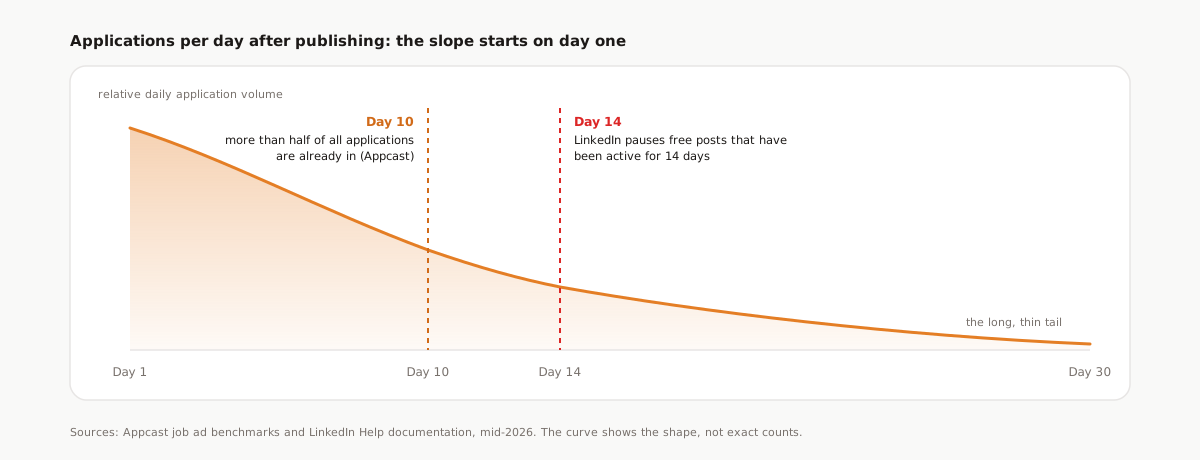
The shape of the window
Appcast's benchmarks are built on volume. The 2026 edition draws on roughly 1,200 employers, 302 million job ad clicks, and 27 million applications, and two findings from that body of data define the launch window.
Applications are front-loaded. More than half of everything a posting will ever receive arrives within the first ten days. The curve is not a plateau with a cliff at the end; it is a slope that starts falling on day one. Every day you wait to engage with the post, it is producing less than it did the day before.
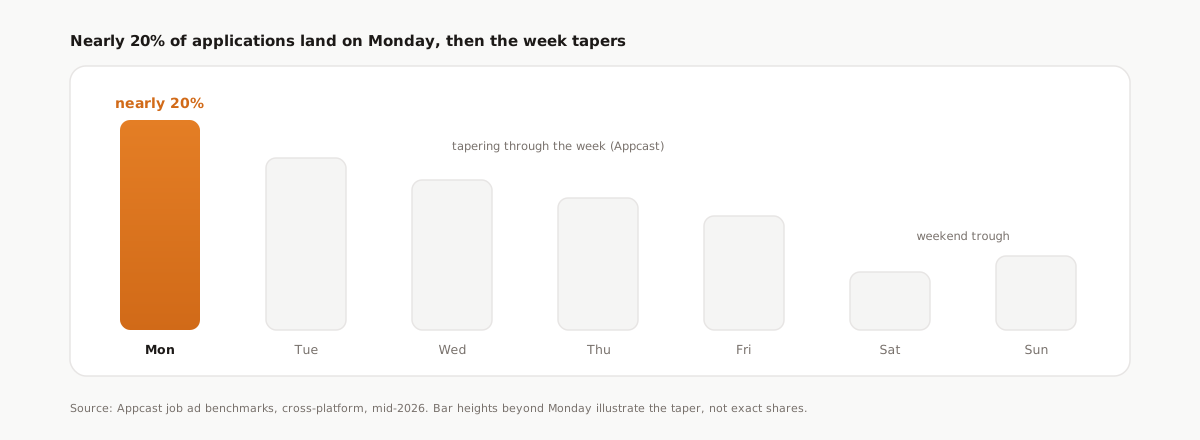
The week has a shape too. Nearly 20 percent of applications land on Monday, tapering through the week. Candidates job-hunt the way everyone works: fresh intentions early in the week, wind-down by Friday, and a weekend trough.
And the pile arrives faster than it used to. The same 2026 report found apply rates surged during 2025 even as recruitment costs rose in a softer labor market. Front-loaded volume multiplied by higher apply rates means the pile you are picturing at week three often exists by day four.
One caveat before you build a plan on these numbers: Appcast's network skews toward high-volume and hourly hiring, so treat the exact percentages as Appcast's findings, not LinkedIn's. A niche senior role may spread its applications differently. The shape, front-loaded and early-week heavy, is the durable part; the decimals are not.
Pick a posting day below and watch what it does to the first fourteen days of the curve.
Launch window planner
Pick the day you publish to see how modeled application volume stacks across your post's first 14 days.
Darker bars are Mondays, the weekly peak. Hover a bar for its cumulative share.
Day 10: roughly 55% of your applications are in
Appcast finds more than half of all applications arrive within the first ten days of a posting.
Day 14: free post pauses at roughly 66%
LinkedIn pauses free job posts once they have been active for 14 days.
Modeled on cross-platform averages from Appcast (more than half of applications within ten days, nearly 20% landing on Monday) and LinkedIn Help documentation, mid-2026. This shows the typical shape, not a guarantee for any single post.
Why the curve slopes down and to the right
Two forces produce the front-loading, and neither cares how good your job description is.
The platform decays your post by design. LinkedIn's documentation is plain about it: free posts become less visible in search results over time, while promoted posts are shown at the top of search results, with visibility and traffic scaling with budget on a cost-per-click model. A free post's search placement is the best it will ever be in the hour it goes live, and it never gets better. That decay is exactly what made the old delete-and-repost "refresh" trick popular, and it is why LinkedIn now forces promotion when you repost a free job too soon. You cannot buy back day one for free anymore.
The most motivated candidates move first. Active job seekers have alerts set and check new postings constantly. They see your post while it is fresh and apply immediately. The applicants who trickle in during week three found a post that search had mostly buried, usually by accident.
The practical conclusion is uncomfortable but freeing: you cannot tend a LinkedIn job post back to health. You can only launch it well.
The launch playbook
Five moves. None of them are difficult, and all of them fail if you attempt them on day eight. They all assume the post itself is finished at publish: complete, specific, and carrying the trust signals candidates now check for before they spend a click.
1. Post Monday morning
Nearly a fifth of the week's applications land on Monday, per Appcast, tapering from there. Publish on Friday afternoon and the freshest, most visible hours of your post's life burn away across the weekend trough. Publish Monday morning and peak freshness meets peak candidate attention. It is the cheapest optimization on this list: same post, same budget, different day.
2. Have screening questions ready at publish
The largest cohort of applicants you will ever get arrives in the first few days. Screening questions added on day six are never answered by the people who applied on day two, which means your most valuable structured data is missing for exactly your biggest group. Write the questions before you publish, the way our screening questions playbook lays out: ask what the resume cannot tell you, prefer numbers and yes/no over prose, and only mark must-haves you mean.
3. Keep the apply flow short
Appcast's data shows jobs with short apply flows, one to five minutes, convert far better than those demanding ten minutes or more. Easy Apply is already on the right side of that line, and the instinct to bolt a long external form onto it to "filter for serious candidates" mostly filters for patience. The signal problem Easy Apply creates is real, but the fix lives after the click, not in front of it; that argument is its own post.
4. Decide promotion by day 5, on evidence
By day five you are past the Monday peak and most of the way through the richest stretch of the window, holding real numbers instead of hope. Ask two questions. Volume: how close are you to the free applicant limit, which per LinkedIn typically sits between 10 and 30? Quality: of the people who applied, how many would you actually interview?
If the qualified volume is there, let the free window run its course. If it is thin, promote on day five, while the post still has organic freshness left to compound, rather than on day twelve as a rescue. Promotion buys placement at the top of search results, with visibility scaling with budget, so it works best amplifying a post that is alive, not resuscitating one that has already decayed.
5. Screen as they arrive, not after the window closes
The launch window ends; the work it produces should not wait until it does. If half of everything arrives by day ten, the founder who exports and screens on day three and again on day seven is making decisions while the post is still producing, which means the day-five promotion call in step 4 rests on resumes actually read, not raw applicant counts. The founder who waits for the post to wind down starts a 300-resume backlog on day fifteen, cold.
After the launch: the pile is the second problem
A launch that works produces the follow-on problem: applicants arriving faster than anyone can read them, front-loaded into exactly the week you are busiest. That is the moment the window playbook hands off to a screening playbook.
This is what Reordinal is built for. The Chrome extension exports your LinkedIn Easy Apply applicants in batches, with resume PDFs and screening answers attached, so the day-three and day-seven exports take minutes each. Every import is parsed and scored against the criteria you wrote for the role, with a per-criterion breakdown, and the screening answers you prepared in step 2 become list filters that stack with the score. The day-five promotion decision stops being "we have 19 applicants" and becomes "we have 19 applicants, 6 above threshold, 3 we would interview tomorrow," which is a decision you can actually make. The full method, from criteria to recorded verdicts, is in our triage playbook.
None of this changes the physics of the window. It changes what the window costs you: ten front-loaded days stop being a threat to your calendar and become the fastest part of the hire.
Frequently asked questions
When do most applications arrive after posting a job?
Early. Appcast's cross-platform data shows more than half of all applications arrive within the first ten days of a posting, and daily volume keeps falling from there into a long, thin tail. Planning around the first ten days matters more than anything you do afterward.
What is the best day of the week to post a job on LinkedIn?
Monday. Appcast finds nearly 20 percent of applications land on Monday, with volume tapering through the week and dipping over the weekend. Publishing Monday morning lines up your post's freshest hours with the week's peak candidate activity.
How long does a free LinkedIn job post stay visible?
Per LinkedIn's current documentation, a free post is paused after being active for 14 days, becomes less visible in search results over time, and is hidden from search once it reaches the free applicant limit, typically 10 to 30 applicants depending on the role. You can also have only one free job post at a time over 30 days.
Should I promote my LinkedIn job post or keep it free?
Decide by day five, on evidence. If the free window has already produced enough qualified applicants, let it run; if volume or quality is thin, promote while the post is still fresh. Promoted posts appear at the top of search results, with visibility scaling with your budget on a cost-per-click model.
Why did my LinkedIn job post stop getting applications?
Usually nothing is broken. Applications are naturally front-loaded, free posts lose search visibility over time by design, and LinkedIn pauses them after 14 active days or hides them from search after the free applicant cap. The fix is a stronger launch on the next post, not tending the current one.