
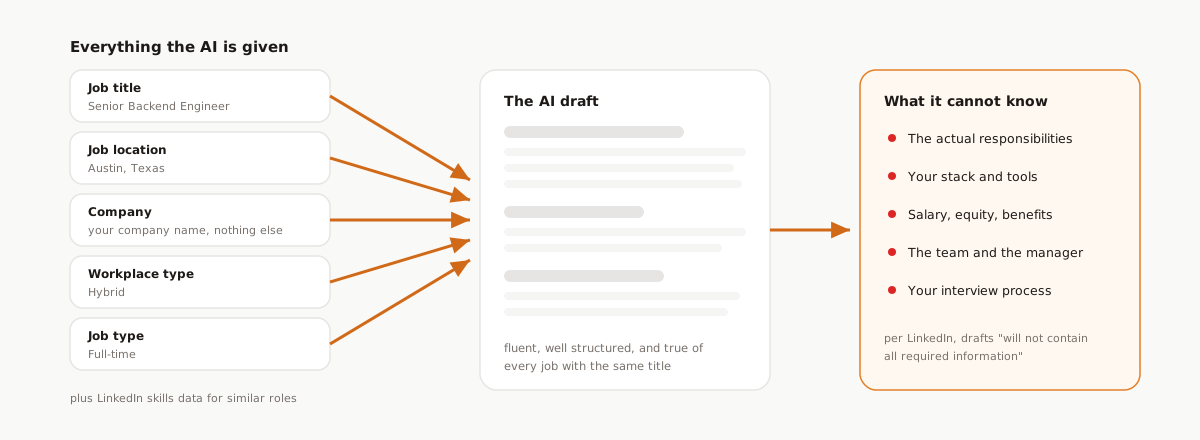
Click "Write with AI" on a new LinkedIn job post and a complete description appears in seconds. Headings, bullet points, a confident closing line about your mission. It feels done, which is exactly the trap, because here is everything the AI knew about your role when it wrote that draft: the job title, the location, your company, the workplace type, and the job type.
That list comes straight from LinkedIn's documentation on AI-assisted job descriptions, which names those five fields, plus LinkedIn's own skills data for similar roles, as the inputs. The draft was not written from your role. It was written from five form fields and a statistical picture of jobs that resemble yours.
LinkedIn says as much, in writing. The same help page notes that you may be required by applicable law to add information such as a salary range, other pay or benefits information, or an applicant privacy notice, and it states plainly that AI drafts "will not contain all required information." The vendor that generated your job description is telling you the job description is incomplete. Believe them.
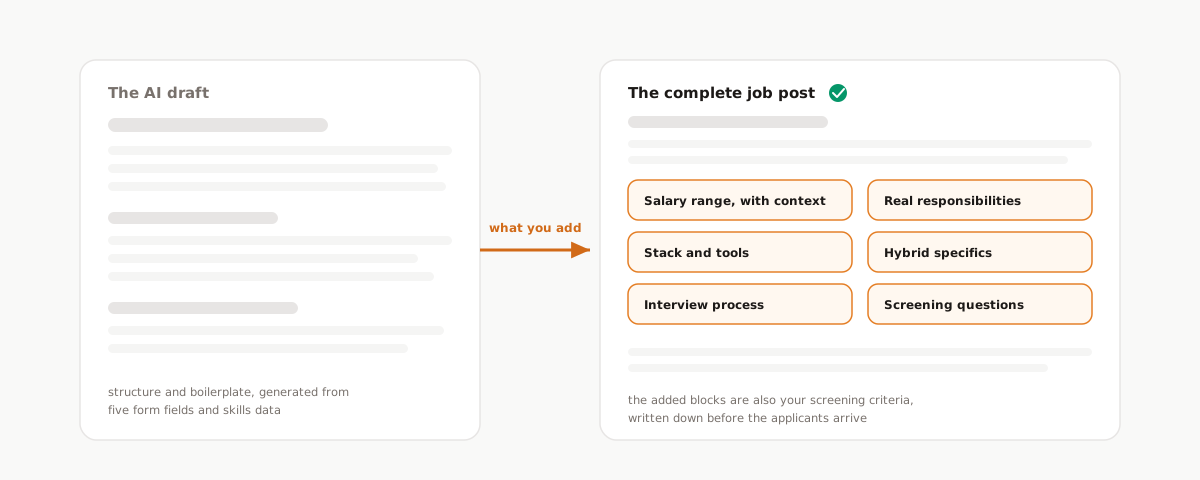
So treat the draft as what it is: a formatting head start, not a job post. This piece covers what the draft structurally cannot contain, and what to add, in order of impact.
What five fields can and cannot tell the AI
Credit where due: the draft does real work. It produces clean structure, a sensible section order, and competent boilerplate in seconds, which kills the blank-page problem that stalls job posts for weeks. As a starting scaffold, it is genuinely useful.
But hold the five inputs in your head and reread the output. Every sentence in it is either derivable from those fields or generic filler, because that is all the model had. Which means the draft cannot contain:
- The actual work. Responsibilities are inferred from the title, so a "Senior Backend Engineer" draft describes the average senior backend job on LinkedIn, not the payments migration and the two services your hire will own in their first quarter.
- Your stack and tools. LinkedIn's skills data supplies skills common for the title, which is not the same thing as the tools your team actually ships with.
- Compensation. Pay is not one of the inputs. No range, no equity, no benefits, and, as LinkedIn warns, none of the pay information your jurisdiction may legally require.
- The team. Who this person reports to, who they will work with, and what the group is trying to build this year.
- Your process. Interview steps, timelines, and what candidates should expect after they apply.
The result reads fluently and says almost nothing that separates your role from every other posting with the same title. Candidates notice. The texture of AI boilerplate is recognizable by now, and a posting made entirely of it signals that the company spent no real time on the ad for a job it claims to care about.
The AI that knows more is not the one you are using
This is worth naming, because "LinkedIn has AI for hiring now" blurs two very different products. LinkedIn's flagship hiring AI is Hiring Assistant, its first AI agent for recruiters, rolled out to charter customers in October 2024 and globally available in English by the end of September 2025. That is an enterprise Recruiter product, sold to teams with recruiting seats. It is not part of the free posting flow.
What free and self-serve posters get is the draft button: a text generator working from five fields. Nothing wrong with that, but calibrate your expectations to it. The AI in your posting flow knows nothing about your company beyond its name, and the version that knows more lives behind an enterprise contract you probably do not have. The intelligence in your job post has to come from you.
What to add, in order of impact
The list is ordered by effect on whether the right people apply, which is the only metric a job description has.
1. A salary range, with context
Two of the three items LinkedIn flags as potentially legally required are about pay, and pay is also where the evidence is loudest. Appcast's job ad content research finds that jobs including salary information consistently receive more clicks, higher apply rates, and often a lower cost per application. Appcast's network skews toward high-volume and hourly hiring, so treat the direction as the finding and attribute it to Appcast rather than to LinkedIn specifically. The direction is unambiguous.
One caution on how you post the range: peer-reviewed research covering roughly 10 million postings found that excessively wide salary ranges can deter women from applying. The fix is not hiding the number. The same research found the effect disappears when the posting adds context about the typical starting salary and how offers are determined. A wide band with one honest sentence of explanation beats both a missing range and a naked one.
Pay transparency and applicant privacy rules vary by state and country, and the AI draft will not add them for you; LinkedIn's own documentation says so. Check the requirements for every location you are hiring in before you publish. This post is guidance, not legal advice.
2. The real responsibilities
Delete the inferred duties and write what this hire will actually do: the projects on the roadmap, the systems they will own, the first hard problem waiting for them. The test is simple: if you swapped your company name for a competitor's, would the posting still be true? If yes, you have not written a job description yet.
While you are in there, rewrite the requirements around the few skills that actually predict success, and drop the degree line unless you mean it. The reach you gain by doing that is the subject of our skills-based job posts piece; the short version is that requirements built from real skills widen the pool without lowering the bar.
3. Stack, tools, and team
Name what the team ships with. Engineers, designers, and marketers all self-select accurately when they can see the tools, and self-selection is screening you get for free. The same goes for team context: who the role reports to, roughly who they will work with, and what the group owns. "You will be our first dedicated data hire, reporting to the CTO" tells a candidate more than three paragraphs of mission prose.
4. Remote and hybrid, in specifics
Workplace type is one of the five inputs, so the draft knows you said "hybrid." It cannot know what hybrid means at your company, and that is the part candidates are deciding on. Which days, anchored to which office, with what time zone overlap for the remote days: write it down. Indeed Hiring Lab's 2026 hiring trends work points to flexibility and transparency as emerging differentiators for attracting workers, with hybrid work still widely valued even as some countries tighten in-office requirements. Specifics are what transparency looks like in a job post.
5. The interview process
Tell candidates what happens after they apply: the steps, roughly how long the whole thing takes, and when they will hear from you. Almost nobody does this, which is exactly why it works. A stated process signals that a real team with a real plan sits behind the posting, which is the same trust problem LinkedIn's job post verification badge is trying to solve at the platform level, and it costs you three sentences.
6. Screening questions, ready at publish
These live outside the description text, but they are part of the post, and the AI will not suggest them because it does not know what disqualifies a candidate for you. Work authorization, notice period, salary expectation, time zone availability: ask at publish time, not after the pile arrives. We wrote a full screening questions playbook on which questions earn their place and how to use the answers.
7. A shorter title than you think
The title is your input, and the AI treats it as given, so check it yourself. Appcast's current data has job titles of 4 to 6 words delivering the strongest apply rates, with rates dropping past 10 words. Cut the keyword stuffing and the internal leveling codes; the title's job is to be found and understood, not to encode your org chart.
Check your draft before you publish
Run your current draft through the checklist below: check off what your posting already covers, and the bar shows how far it has moved from AI draft to complete job post.
Is your draft a job post yet?
Check off everything your posting already covers. The bar tracks the distance from AI draft to complete job post.
0 of 9 covered: still an AI draft
Legal requirements vary by state and country; this checklist is guidance, not legal advice. Based on LinkedIn Help documentation, mid-2026.
The same gaps come back at screening time
Here is why this is more than a copywriting exercise: every blank you leave in the post becomes a blank in your screening.
Easy Apply will deliver volume either way; one-click applying guarantees it, and we walk through that trade in Easy Apply volume vs signal. What the post decides is whether the volume contains the right people, and whether you can tell. A posting with no real responsibilities attracts applicants you cannot evaluate against real responsibilities, because you never wrote any down.
Flip that around and every fix above does double duty. The responsibilities, the skills that replaced the degree line, the comp boundaries, the screening questions: that is a criteria list, written at publish time. In Reordinal it becomes the screening system directly. Applicants exported with the Chrome extension arrive with their resume PDFs and screening answers, every resume is parsed and scored against your role criteria with a per-criterion breakdown, and the screening answers become filters on the candidate list. The specific job post and the fast first screen are the same piece of thinking, done once, at the moment you fixed the draft.
Frequently asked questions
What information does LinkedIn's AI use to write a job description?
According to LinkedIn's help documentation, the draft is generated from five inputs: job title, job location, company, workplace type, and job type, supplemented by LinkedIn's skills data for similar roles. It does not read your website, your docs, or anything else about the actual role.
Is the LinkedIn AI job description good enough to post as is?
No, and LinkedIn says so itself: its documentation states that AI drafts "will not contain all required information," including items applicable law may require, like a salary range, benefits information, or an applicant privacy notice. Treat the draft as structure and add the substance yourself.
Do I have to include a salary range in a LinkedIn job post?
It depends on where you are hiring. Many jurisdictions require posted pay information, and LinkedIn notes you may be required by applicable law to add it. Even where optional, Appcast's research shows postings with salary information get more clicks and higher apply rates.
Why does my LinkedIn job description sound generic?
Because the AI draft is generated from five form fields plus skills data for similar roles, it describes the average job with your title rather than your job. Adding real responsibilities, the actual stack, and team specifics is what separates your post from every other posting with the same title.
Does posting a wide salary range hurt applications?
Peer-reviewed research covering roughly 10 million postings found that excessively wide ranges can deter women from applying. The effect disappears when the posting adds context about the typical starting salary and how offers are determined, so explain the range instead of narrowing it artificially.